
Arrays and Pointers#
What we know#
Recall that Python is built on top of C. It’s meant to make things easier for the programmer, and so provides the programmer with a powerful set of tools built on top of C capabilities. However, to understand what’s happening under the hood and our runtimes, we need to understand what C is actually doing when we call fancy Python operations.
Pointers#
The first thing we need to understand is the pointer. Most variables in Python don’t store actual data values. Instead, they store the memory address for where the data value can be found. This seems unnecessarily complicated, but can have great benefits as we’ll see. To start understanding pointers, consider the following code:
a = [1, 2, 3]
b = a
b.append(4)
print(a)  # Output: [1, 2, 3, 4]
When we change b, we’re also changing a. In this example, a and b are not two separate lists. They are two different labels, or “names,” that point to the exact same list object in memory.
A pointer is simply a variable that holds the memory address of another variable.
Think of it like this:
Memory: A massive storage locker, with each locker having a unique address (a long number like
0x7f4c3a2f8d0).Objects: The actual data, like
[1, 2, 3], stored inside one of these lockers.Variables: The labels you create (
a,b). Instead of holding the data itself, these labels hold the address of the locker where the data is stored.
So, when you say a = [1, 2, 3], what’s really happening is:
Python creates a list object
[1, 2, 3]and puts it in a memory locker (let’s say, at address0x123).The variable
ais created, and it stores the address0x123.ais a pointer.
When you say b = a, what’s happening is:
The variable
bis created.It’s given the same address that
aholds:0x123.Now both
aandbare pointers, and they both point to the same list object.
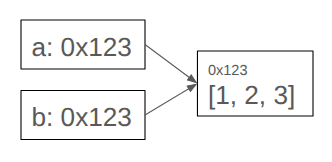
When you use a method like b.append(4), you’re telling Python:
Go to the address that
bis pointing to (0x123).In that memory locker, find the object (which is the list) and modify it by adding
4.
Because a is still pointing to the very same memory address, when you print(a), it goes to the same locker and sees the updated list [1, 2, 3, 4].
Arrays#
We also need to understand how the Python lists we use are built on top of C arrays. C arrays are much more rigid and constrained than Python lists.
Here’s a breakdown of the key differences:
Homogeneity: A Python list can hold items of different types:
[1, "hello", 3.14]. An array, by contrast, is homogeneous. It can only store items of a single, specified data type. You’d have an array of integers, or an array of floating-point numbers, but not both in the same array. This strictness is what makes them so efficient. Python lists achieve their heterogeneity by having every list be a C array of pointers - at the other end of those pointers are the actual data.Fixed Size: A Python list seems to be a master of flexibility. You can
append(), for example. An array has a fixed size from the moment it’s created. If you declare an array to hold 10 integers, it will always hold exactly 10 integers. To add an 11th, you’d have to create a new, larger array and copy all the elements over. We’ll spend a fair amount of time understanding how Python lists seem to change size.Performance and Memory: These nice flexible properties of Python lists come at a cost - they’re slower and use more memory (but only a coefficient’s worth!).