
Our First ADTs: Lists, Stacks, and Queues#
This course is about Abstract Data Types (ADTs) and their implementation with Data Structures.
Abstract Data Types (ADTs)#
An ADT is a description of how to use data, but not how that data is stored or implemented. It can be thought of as a formally defined interface. This concept is a core principle of object-oriented programming: the separation of interface and implementation.
Common ADTs include:
List
Stack
Queue
Map
Priority Queue
Graph
We’re going to start with the first three.
Data Structures#
A data structure is the concrete implementation of an ADT. At their most basic, data structures are variables, arrays, or linked lists, along with the functions that make them behave in a way that implements a specific ADT.
Lists#
A List is a container that holds data in a specific order.
An indexed list is a type of list where elements are identified by their position, or index. It supports the following operations, which specify its behavior as an ADT:
get(i): Returns the data at the ith position in the list.set(i, e): Replaces the data at the ith position with element e and returns the old data.add(i, e): Inserts element e at position i. All elements with an index greater than i are shifted to a new index one greater than their previous index.remove(i): Removes the data at position i. All elements with a higher index are shifted down.
Implementation with an Array#
An array is a common way to implement an indexed list.
The
getandsetoperations are efficient, taking constant time, or O(1).The
addandremoveoperations are less efficient. In the worst-case scenario, they require shifting many elements, making their runtime proportional to the number of elements, or O(n).
This implementation might look like this (though in Python, this is a little
silly since the most basic array-like thing is already a list):
class IList:
    def __init__(self):
        self.A = []
        self.capacity = 0
        self.size = 0

    def get(self, index):
        return self.A[index]

    def set(self, index, elem):
        f = self.A[index]
        self.A[index] = elem
        return f

    def add(self, index, elem):
        # Make a new array which is one bigger
        if self.size == self.capacity:
            newA = [None]*self.capacity+1
            for i in range(self.size):
                newA[i]=self.A[i]
            self.A = newA
            self.capacity += 1

        # Make room at index by sliding everything in a larger index over
        for j in range(self.size, index, -1):
            self.A[j] = self.A[j-1]
        self.A[index] = elem
        self.size += 1

    def remove(self, i):
        for j in range(i, self.size-1):
            self.A[j] = self.A[j+1]
        self.size -= 1
Implementation with a Linked List#
A linked list can also be used to implement an indexed list. get(), set(),
add() and remove() could be made to work, but all would be \(O(n)\), because
they depend on accessing an arbitrary index.
Stacks#
A Stack is an ADT with two primary operations that follow the “last-in, first-out” (LIFO) principle. It’s a container where you can only add or remove elements from the “top”.
The main operations are:
push(e): Adds element e to the top of the stack.pop(): Removes and returns the most recently added item.top()/peek(): Returns the most recently added item without removing it.
Uses of Stacks#
Stacks have several practical applications:
Reversing a sequence: Pushing a series of items onto a stack and then popping them off reverses their order.
Navigating backward: Stacks can be used to track a path, like breadcrumbs in a maze, allowing you to backtrack to a previous point.
Managing function calls: A call stack is used by a program to manage function calls. When a function is called, it is pushed onto the stack. When it returns, it is popped off.
Matching pairs: Stacks are useful for checking if parentheses, brackets, or other symbols are correctly matched in an expression.
Implementation of Stacks#
Stacks can be implemented using either a linked list or an array.
With a linked list, you can implement
pushby inserting at the head andpopby removing the head. Both operations are very efficient, taking O(1) time.With an array, you can keep track of the next empty spot and add or remove elements from there. Both
pushandpopare typically O(1) operations.
When an array-based stack runs out of space, it must be resized by copying
all its elements to a new, larger array. If we make it one bigger, this would
make push() into an \(O(n)\) operation. However, if we make it twice as big,
then it makes lots and lots of open spaces, and each push() for a while is
\(O(1)\). We can perform something called amortized analysis, which shows
that while it’s occasionally \(O(n)\), it is nearly always \(O(1)\), and the
average runtime in a long sequence of pushes is \(O(1)\), so that’s what we
call it. This is what is implemented in Python’s append() function on a
list.
Amortization is an accounting technique of spreading cost of occasional purchases across many years. Let’s say your business buys a $100,000 machine every 10 years, how would you run your books? You could make money 9 out of 10 years, and lose big the 10th year, or you could amortize the cost, saying the the machine costs you $10,000 per year. We can do the same thing with run times when we have an occasional expensive operation among many cheap ones.
The following table counts the number of assignments necessary to push onto a stack implemented with an array, and spreads those assignments out across earlier, cheaper pushes.
size |
cost for each push |
|---|---|
1 |
1 2 (second push requires a copy, then a push |
2 |
3 0 (amortize some cost earlier) |
2 |
3 0 3 (push requires 2 copies plus push) |
4 |
3 3 0 (amortize) |
4 |
3 3 0 1 (simple push) |
4 |
3 3 0 1 5 (copies + push) |
8 |
3 3 3 3 0 (amortize) |
8 |
3 3 3 3 0 1 1 1 9 |
16 |
3 3 3 3 3 3 3 3 0 (amortize) |
16 |
3 3 3 3 3 3 3 3 0 1 1 1 1 1 1 1 17 |
32 |
3 3 3 3 3 3 3 3 3 3 3 3 3 3 3 3 0 |
32 |
3 3 3 3 3 3 3 3 3 3 3 3 3 3 3 3 0 1 1 1 1 1 1 1 1 1 1 1 1 1 1 1 33 |
64 |
3 3 3 3 3 3 3 3 3 3 3 3 3 3 3 3 3 3 3 3 3 3 3 3 3 3 3 3 3 3 3 3 0 |
As you can see, the amortized cost of each push never grows beyond 3, and so we can still say the cost of a push, even with resizing the array, is \(O(1)\).
We can further illustrate this by graphing the number of assignments necessary to do a push for some large number of pushes. The below function counts the number of assignments necessary to perform each of N consecutive pushes. capacity refers to the size of the array, and size refers to the number of elements that have been put in the array. Note that capacity doubles when the array is full (meaning size==capacity). this_assign counts the number of assignments for that push, and appends it to a list, so the function can return a list of all the assignments required for each push.
def count_assignments(N):
    capacity = 1
    size = 0
    assignments = []
    for _ in range(N):
        this_assign = 0
        if size == capacity:
            this_assign = size
            capacity *= 2
        this_assign += 1
        size += 1
        assignments.append(this_assign)
    return assignments
Here we do this with N=10, and you can see that the number of assignments matches the illustration in class.
print(count_assignments(10))
[1, 2, 3, 1, 5, 1, 1, 1, 9, 1]
OK, let’s do this for 10,000 consecutive pushes, and then plot the result.
assignments = count_assignments(10000)
import plotly.io as pio
pio.renderers.default = 'notebook'
import plotly.express as px

fig = px.line(y=assignments, title="Assignments per push")

fig.show()
---------------------------------------------------------------------------
ModuleNotFoundError                       Traceback (most recent call last)
File ~/miniforge3/envs/book/lib/python3.14/site-packages/plotly/express/_core.py:1210, in to_named_series(x, name, native_namespace)
   1209 try:
-> 1210     import pandas as pd
   1212     return nw.new_series(name=name, values=x, native_namespace=pd)

ModuleNotFoundError: No module named 'pandas'

During handling of the above exception, another exception occurred:

NotImplementedError                       Traceback (most recent call last)
Cell In[4], line 5
      1 import plotly.io as pio
      2 pio.renderers.default = 'notebook'
      3 import plotly.express as px
      4
----> 5 fig = px.line(y=assignments, title="Assignments per push")
      6
      7 fig.show()

File ~/miniforge3/envs/book/lib/python3.14/site-packages/plotly/express/_chart_types.py:270, in line(data_frame, x, y, line_group, color, line_dash, symbol, hover_name, hover_data, custom_data, text, facet_row, facet_col, facet_col_wrap, facet_row_spacing, facet_col_spacing, error_x, error_x_minus, error_y, error_y_minus, animation_frame, animation_group, category_orders, labels, orientation, color_discrete_sequence, color_discrete_map, line_dash_sequence, line_dash_map, symbol_sequence, symbol_map, markers, log_x, log_y, range_x, range_y, line_shape, render_mode, title, subtitle, template, width, height)
    221 def line(
    222     data_frame=None,
    223     x=None,
   (...)    264     height=None,
    265 ) -> go.Figure:
    266     """
    267     In a 2D line plot, each row of `data_frame` is represented as a vertex of
    268     a polyline mark in 2D space.
    269     """
--> 270     return make_figure(args=locals(), constructor=go.Scatter)

File ~/miniforge3/envs/book/lib/python3.14/site-packages/plotly/express/_core.py:2520, in make_figure(args, constructor, trace_patch, layout_patch)
   2517 user_provided_colorscale = args.get("color_continuous_scale") is not None
   2518 apply_default_cascade(args, constructor=constructor)
-> 2520 args = build_dataframe(args, constructor)
   2521 if constructor in [go.Treemap, go.Sunburst, go.Icicle] and args["path"] is not None:
   2522     args = process_dataframe_hierarchy(args)

File ~/miniforge3/envs/book/lib/python3.14/site-packages/plotly/express/_core.py:1763, in build_dataframe(args, constructor)
   1760     args["color"] = None
   1761 # now that things have been prepped, we do the systematic rewriting of `args`
-> 1763 df_output, wide_id_vars = process_args_into_dataframe(
   1764     args,
   1765     wide_mode,
   1766     var_name,
   1767     value_name,
   1768     is_pd_like,
   1769     native_namespace,
   1770 )
   1771 df_output: nw.DataFrame
   1772 # now that `df_output` exists and `args` contains only references, we complete
   1773 # the special-case and wide-mode handling by further rewriting args and/or mutating
   1774 # df_output

File ~/miniforge3/envs/book/lib/python3.14/site-packages/plotly/express/_core.py:1416, in process_args_into_dataframe(args, wide_mode, var_name, value_name, is_pd_like, native_namespace)
   1408     if length and (len_arg := len(argument)) != length:
   1409         raise ValueError(
   1410             "All arguments should have the same length. "
   1411             "The length of argument `%s` is %d, whereas the "
   1412             "length of previously-processed arguments %s is %d"
   1413             % (field, len_arg, str(list(df_output.keys())), length)
   1414         )
-> 1416     df_output[str(col_name)] = to_named_series(
   1417         x=argument,
   1418         name=str(col_name),
   1419         native_namespace=native_namespace,
   1420     )
   1422 # Finally, update argument with column name now that column exists
   1423 assert col_name is not None, (
   1424     "Data-frame processing failure, likely due to a internal bug. "
   1425     "Please report this to "
   1426     "https://github.com/plotly/plotly.py/issues/new and we will try to "
   1427     "replicate and fix it."
   1428 )

File ~/miniforge3/envs/book/lib/python3.14/site-packages/plotly/express/_core.py:1215, in to_named_series(x, name, native_namespace)
   1213 except ImportError:
   1214     msg = "Pandas installation is required if no dataframe is provided."
-> 1215     raise NotImplementedError(msg)

NotImplementedError: Pandas installation is required if no dataframe is provided.
You can see the increasingly-large peaks representing the \(O(n)\) operation required for building the occasional new array. You can also see that these peaks are getting increasingly far apart.
Now below, I calculate the average number of assignments necessary for each push. In other words, when the x-axis is 15, the y-axis is the average number of assignments required to do that many pushes.
averages = []
for i in range(len(assignments)):
    averages.append( sum(assignments[:i])/(i+1))

fig = px.line(y = averages, title="Average assignments per push up to this point")
fig.show()
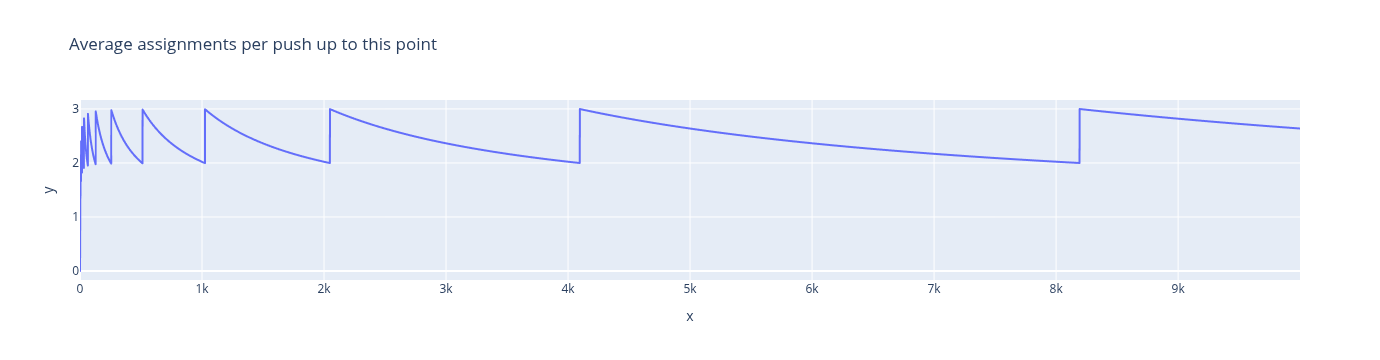
Note that the average number of pushes never rises above 3, no matter how many pushes we do. The average number of pushes does not increase as N increases, so the average amount of work is \(O(1)\).
Queues#
A Queue is an ADT where items are processed in the order they are added, following a “first-in, first-out” (FIFO) principle. It’s similar to waiting in a line.
The two main operations are:
enqueue(e): Adds element e to the back of the queue.dequeue(): Removes and returns the oldest item from the front of the queue.head(): Returns the oldest item without removing it.
Implementation of Queues#
Like stacks, queues can be implemented with a linked list or an array.
Using a linked list, you can
enqueueby adding to the tail anddequeueby removing from the head. Both operations are efficient with an O(1) time complexity.Using an array presents a new problem: as elements are added and removed, the data “walks” to the right side of the array. To solve this, a circular array approach can be used. This involves keeping track of both the front and back of the queue and “wrapping around” the array when the end is reached. Again, when we run out of room, we resize to one twice as big, and benefit from the averaging behavior of the occasional slow enqueue. This method ensures that
enqueueanddequeueare both O(1) operations, even with resizing.